
The National Testing Agency (NTA) has announced the UGC NET December 2026 Application Correction Window for candidates who have successfully submitted their online application forms. Candidates who have made mistakes while filling out their application forms can use this opportunity to review and correct their details, subject to the correction rules prescribed by NTA.
Join UGC NET Online Course – Click Here
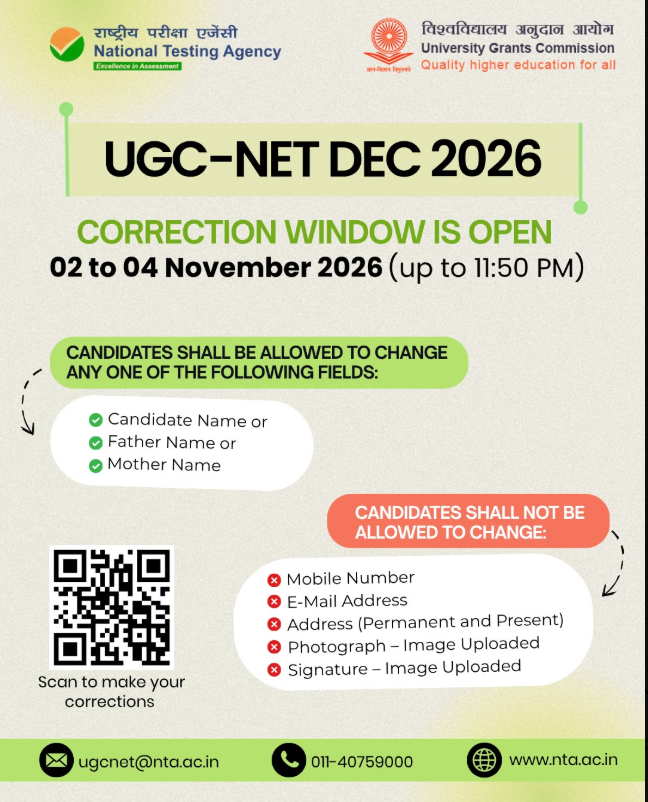
According to the announced schedule, the UGC NET December 2026 Correction Window will remain open from 2 November to 4 November 2026, up to 11:50 PM. Candidates are advised to carefully check their application forms and make all permitted corrections before the deadline.
The application correction facility will be available through the official UGC NET website, ugcnet.nta.nic.in. Candidates will need their login credentials to access the submitted application form and complete the correction process.
UGC NET December 2026 application form has been extended to 31 October 2026.
It is important to remember that NTA may restrict changes to certain application fields. Therefore, candidates should check the official correction notice before making any modifications.
UGC NET December 2026 Application Correction: Important Dates
Candidates should keep the following details handy to avoid missing the correction deadline.
| Particulars | Details |
| Examination Name | UGC NET December 2026 |
| Conducting Authority | National Testing Agency (NTA) |
| Correction Facility | Application Form Correction |
| Correction Window Start Date | 2 November 2026 |
| Correction Window Last Date | 4 November 2026 |
| Last Time for Correction | 11:50 PM |
| Mode of Correction | Online |
| Official Website | ugcnet.nta.nic.in |
| Helpline Number | 011-40759000 |
| Email Address | ugcnet@nta.ac.in |
Important: The correction facility will be available only during the specified period. Candidates should complete the process well before 4 November 2026 to avoid last-minute technical difficulties.
UGC NET December Notification 2026 Out @ugcnet.nta.ac.in, Apply Online Link Active
What Is the UGC NET Application Correction Window?
The UGC NET Application Correction Window is an opportunity provided by NTA to candidates who have already submitted their online examination application forms but want to correct certain details.
While filling out an examination application form, candidates may sometimes make mistakes in personal information, educational details, category selection or other entries. Even a small error can create problems during later stages of the examination process.
UGC NET December Exam 2026 New Notification Out: 28 BIG Changes in Official Notification
The correction window allows candidates to review their submitted information and modify the fields that NTA permits them to edit.
However, candidates should understand that the correction facility does not necessarily allow changes to every field. Some details may remain locked or restricted according to NTA’s official guidelines.

Who Can Use the UGC NET December 2026 Correction Facility?
The correction facility is intended for candidates who have submitted their UGC NET December 2026 application forms successfully.
Candidates should ensure that:
- They have completed and submitted their online application form.
- They have their Application Number and login credentials.
- They can access the official UGC NET candidate login portal.
- They have checked the official correction guidelines.
- They are making changes only to the fields permitted by NTA.
Candidates who have not submitted their application forms should not assume that the correction window can be used as a substitute for the original application process.
Click Here – UGC NET Exam 2026 Exam Date for December exam

Details to Check Before Submitting the Corrected Application Form
Before making any changes, candidates should carefully review all the information entered in their application forms.
The following details deserve special attention:
1. Personal Details
Check your personal information carefully, including your name, date of birth and other identity-related details. Make sure that the information matches your relevant official documents.
2. Category and Reservation Details
Candidates belonging to General, EWS, OBC-NCL, SC, ST and PwD categories should carefully review their selected category and reservation-related information.
If a category correction is permitted, ensure that you have the required supporting documents as per the official guidelines.
3. Educational Qualification Details
Review your educational qualifications, including your degree details, qualifying examination information, marks or percentage and other academic information entered in the application form.
Ensure that your details are consistent with your academic certificates and mark sheets.
4. Subject and Examination Details
Check your selected UGC NET subject and other examination-related preferences carefully.
Candidates should ensure that the selected subject is appropriate according to their educational background and the eligibility guidelines.
5. Photograph and Signature
Check whether your uploaded photograph and signature meet the specifications mentioned in the official information bulletin.
If corrections or re-uploads are permitted, follow the prescribed file format, size and image requirements.
Click Here – Check UGC NET Notification 2026 December Session Important Dates
6. Contact Information
Review your registered mobile number, email address and communication details. These details are important because NTA may use them to communicate examination-related updates.
Note: The above list is intended as a verification checklist. It does not mean that every listed field can be edited during the November 2026 correction window. The final editable fields will be determined by NTA.

How to Correct the UGC NET December 2026 Application Form? Step-by-Step Process
Candidates can follow the steps below to access their submitted application forms and make permitted corrections.
Step 1: Visit the Official UGC NET Website
First, open the official website of UGC NET:
Always use the official NTA website to access the correction facility. Avoid entering your personal information on unofficial websites or third-party links.
Step 2: Find the Application Correction Link
After opening the homepage, look for the Candidate Activity section or the latest UGC NET December 2026 announcements.
Find the link related to:
Correction in Particulars of Online Application Form for UGC NET December 2026
Click on the correction link to proceed.
The exact wording or placement of the link may differ depending on the website update.
Step 3: Enter Your Login Credentials
The candidate login page will open.
Enter the required details, such as:
- Application Number
- Password or other requested login credentials
- Security Pin or Captcha, if displayed
After entering the required information, click on the Login or Submit button.
Keep your login credentials confidential and do not share your password or OTP with anyone.
Step 4: Open Your Submitted Application Form
After successful login, your submitted application details should be displayed.
Carefully review the information available on the screen. Identify the fields containing incorrect or incomplete information.
Do not make unnecessary changes to information that is already correct.
Step 5: Edit the Permitted Details
Select the relevant editable field and enter the correct information.
Depending on NTA’s correction rules, certain details may be editable while others may remain locked.
Before proceeding, check the information against your official documents, such as:
- Class 10 and Class 12 certificates
- Graduation and post-graduation mark sheets
- Category certificate, wherever applicable
- Valid identity documents
- Other supporting documents, if required
If the portal requires document uploads, follow the prescribed instructions.
Step 6: Review All Changes Carefully
After making the necessary corrections, use the Preview or Review option, if available.
Check every modified detail before submitting the form.
Pay particular attention to spelling, dates, category information, subject selection and uploaded documents.
This step is important because incorrect information in the corrected form may create difficulties during further examination procedures.
Step 7: Submit the Corrected Application Form
Once you are satisfied with all the changes, click on the Final Submit or Submit button, as displayed on the portal.
If an additional confirmation or correction fee is required for a particular modification, follow the payment instructions displayed on the official portal.
Do not assume that all corrections are free. Check the official notification for applicable charges and payment rules.
UGC NET Eligibility Criteria 2026: Check Age Limit, Educational Qualification & Reservation
Step 8: Download and Save the Confirmation Page
After successfully submitting the corrections, download the updated application form or confirmation page, wherever available.
Keep a copy on your mobile phone or computer.
Candidates are advised to save the document in PDF format and take a printout for future reference.
Important Instructions for UGC NET December 2026 Candidates
Candidates should keep the following points in mind while using the correction facility:
- Complete corrections before the deadline: The correction window closes on 4 November 2026 at 11:50 PM.
- Use the official website: Make corrections only through the NTA’s official UGC NET portal.
- Check editable fields: Not every detail may be available for modification.
- Verify personal information: Ensure that your name, date of birth and academic details are correct.
- Check category information: Review reservation-related details and supporting documents carefully.
- Avoid unnecessary changes: Modify only those details that genuinely require correction.
- Check payment requirements: If any correction fee is applicable, complete the payment according to the official instructions.
- Save the updated application: Download the corrected form or confirmation page after successful submission.
- Do not wait until the last day: Complete the process early to avoid website traffic, payment failures or technical issues.
- Read the official notice: Always follow the latest NTA instructions regarding the correction process.
UGC NET Courses 2026: Get Best Courses for JRF, Assistant Professorship for December Session
What Should Candidates Do If They Forget Their Login Password?
Candidates who have forgotten their login password should use the available Forgot Password option on the official candidate login page, if provided.
Follow the instructions displayed on the portal to recover or reset your password.
Candidates should keep their registered mobile number and email address accessible because verification may be required.
If the login problem continues, contact NTA through the official helpline or email address.
What If the UGC NET Correction Window Is Not Opening?
Sometimes candidates may face technical issues while accessing the correction portal, especially when many applicants are trying to log in simultaneously.
UGC NET Age Limit 2026: Check Assistant Professor and JRF Category-Wise Age Relaxation
If the correction link is not opening, try the following steps:
- Refresh the official website and try again.
- Check your internet connection.
- Open the website in another browser.
- Clear your browser cache if necessary.
- Try accessing the portal during non-peak hours.
- Check the latest NTA announcements for any technical updates.
If the problem continues, contact the NTA helpdesk and explain the issue. Keep your Application Number and relevant screenshots available for reference.
Do not wait until the final hours to report a technical problem.
UGC NET Selection Procedure 2026: Complete Step-by-Step Process
UGC NET December 2026 Official Website and Helpdesk Details
For any queries regarding the application correction process, candidates can contact NTA through the following official communication channels.
| Contact Details | Information |
| Official Website | https://ugcnet.nta.nic.in/ |
| Helpdesk Number | 011-40759000 |
| Email Address | ugcnet@nta.ac.in |
| Correction Window | 2–4 November 2026 |
| Last Time | 11:50 PM |
Candidates should use these contact details for examination-related assistance and refer to the official website for the latest updates.
UGC NET Syllabus 2026: Latest Paper 1 & Paper 2 Subject-Wise PDF
Conclusion
The UGC NET December 2026 Application Correction Window is an important opportunity for candidates who have already submitted their examination forms and need to correct any permitted mistakes.
As per the announced schedule, the correction facility will remain available from 2 November to 4 November 2026, up to 11:50 PM through the official UGC NET website.
UGC NET Paper 1 Unit-Wise Syllabus : Complete Study Material, Notes & Preparation Guide
Candidates should carefully review their personal information, academic qualifications, category details, examination subject and other application entries. Before submitting the corrected form, they must verify all changes and ensure that the information is accurate.
Do not wait until the last date to complete the correction process. Visit the official NTA portal, check the applicable correction rules and save the updated confirmation page after successful submission.
Stay connected with JRFAdda for the latest UGC NET December 2026 notifications, examination updates, syllabus, preparation strategies, mock tests and study materials.
UGC NET December 2026 Application Correction Window – FAQs